Before Leaving
- Prepare the operator accounts and supported payment methods for the planned networks.
- Check any required account verification.
- Compare the departure battery level with the car and allow enough reserve for the backup.
- Save the primary and backup locations.
- Check recent E07 successes and current operator status.
- Confirm the charger model and voltage capability at uncertain sites.
- Carry a Type 2 cable for a planned untethered AC fallback.
- Allow extra time on sparse regional routes.
- Replan early if consumption is higher than expected.
A Four-Step Planning Workflow
Sketch the Route in PlugShare
Use filters that match the E07’s connector and the charging speed you need. Read recent check-ins, not only the site’s star rating.
Open the Network App
Confirm the site and its supported access/payment method in the operator’s current app or website. The community starter list includes Evie, Chargefox, bp pulse, Ampol, Everty, My NRMA and JOLT; prepare the accounts needed for your planned stops. A network app or site listing does not establish E07 compatibility.
Check Access and Hardware
Look for opening hours, parking restrictions, cable availability, multiple bays and recent successful sessions. Some Tesla locations permit eligible non-Tesla vehicles; check the Tesla app for the specific location rather than assuming access.
Choose a Backup
Before leaving a working charger, identify another fast charger within comfortable remaining range. On sparse inland routes, note a slower fallback, its added travel time and the energy reserve needed to reach it.
Use DEEPAL for your vehicle’s battery information and controls, PlugShare to research sites and check-ins, and the operator’s supported method for its charging session and payment. These are separate account and app tasks.
350 kW First, Then 150 kW Plus
This community rule of thumb helps shortlist stops when you have a choice. Confirm the exact site with recent successful E07 check-ins and the operator’s current status.
Start with 350 kW Sites
Look for newer high-voltage equipment and several working bays. A 350 kW site is a useful first candidate; it does not make the E07 charge at 350 kW or guarantee that a session will start.
Use 150 kW-Plus Sites as the Next Choice
Check the charger model, access and recent E07 reports. Choose a proven working site over a higher-power site with unresolved faults.
Check Older 50 kW Sites More Closely
Read the model and output-voltage specifications, PlugShare history and recent check-ins. A nearby CHAdeMO connector is a reason to investigate the hardware, not an automatic rejection: some 50 kW dual-connector sites work with E07s.
Prefer multiple working bays, useful facilities and mobile reception. Wind, rain, temperature, hills, speed, load and detours can change energy use, so compare the estimate with current conditions.
Use the Rating to Shortlist, Then Check the Equipment
A kW label or CHAdeMO cable does not establish a charger’s installation year, voltage capability or E07 compatibility. Avoid blanket rules about an entire network: owners report both working and unsuccessful NRMA, Evie and Chargefox sessions at different sites.
Optional Charger Model and Voltage Research
Why Two 50 kW CCS2 Chargers Can Differ
The E07 is described as an 800 V vehicle. A charger must provide a suitable voltage and current, and the car and charger must successfully communicate. These Tritium models show why the model number matters even when the advertised power is identical.
Tritium RT50 versus RTM50
- RT50: 50 kW, with a manufacturer-listed output range of 50–500 V in the datasheet previously reviewed for this guide.
- RTM50: also 50 kW, but the supplier’s RTM50/RTM75 specification lists output up to 920 V.
The historical RT50 specification’s 500 V ceiling and the RTM50’s 920 V capability are substantially different. The original RT50 download was unavailable on 10 October 2026, so its specification and page citation were not freshly verified. Identify the installed model instead of relying on “50 kW CCS2” alone. These published specifications do not identify which unit was installed at a particular reported failure.
Some 800 V vehicle designs convert lower-voltage DC internally. We have not established the Australian E07’s complete lower-voltage DC conversion capability from the reviewed primary documents. Another car charging successfully at the same unit therefore does not establish E07 compatibility or diagnose the cause of a failed E07 session.
Tesla also distinguishes the cabinet from the post: its V3 cabinet supports up to 500 V, while its V4 cabinet supports up to 1000 V. A V4 post connected to a V3 cabinet retains the V3 voltage limit. Post appearance and advertised kW alone cannot settle the voltage question.
Gilbarco Veeder-Root Series RTM Specifications, PDF viewer page 1. The original Tritium RT50 datasheet download was unavailable on 10 October 2026; its specification and page citation were not freshly verified.
More Than the Shape of the Plug
The community’s charging illustrations highlight two useful ideas: connector standards differ by region, and newer charging equipment combines higher power with communication and control. For an Australian E07 stop, check three things:
- Connector: Type 2 for AC or CCS2 for DC, with the cable required at that site.
- Electrical Capability: the charger’s voltage/current range and the vehicle’s limits, not just the station’s headline power.
- Session Setup: access, payment/authentication, communication and safety checks must all succeed before energy flows.
The E07’s published maximum is 7 kW AC and 240 kW DC. Actual power varies with the equipment, battery temperature, state of charge and site conditions. The illustrations’ technology timelines and future home/grid or megawatt-charging concepts are background, not E07 specifications or a promise of those features.
September 2026 Australian E07 Specification Sheet, PDF viewer page 2 · Example of a Manufacturer-Documented Voltage-Conversion Design
The Community E07 Charger Map
A community-run form and map collects E07-specific charging reports. Contributors can add a location pin, network, rated speed and whether the session worked, then update an existing location as new reports arrive.
The map groups reports into simple Choose, Caution and Avoid signals. Treat them as dated community observations. A site can be repaired, upgraded or temporarily unavailable after a report is submitted.
Open the Community E07 Charger Map · How to Read and Report Charger Results
Compatibility Reports Need Context
Owners have discussed reduced speed or failed sessions at some older chargers, including selected NRMA locations. Those reports do not justify avoiding an entire network. Check the exact site, charger model, date, vehicle software and follow-up reports.
Tesla Supercharger charging remains an ongoing owner-reported issue. Owners report unsuccessful E07 charging attempts. Tesla’s Australian guidance says selected sites support other CCS-enabled EVs and require compatible communication and safety protocols; it does not confirm E07 compatibility. As of 29 September 2026, we have not found E07-specific confirmation or a fix from Tesla or DEEPAL Australia. A site appearing in the Tesla app is not confirmation that an E07 will charge there. Plan around other suitable charging sites until compatibility is confirmed, and check the current report and resolution status before travelling.
If the Charger Will Not Start
Record the site, stall, error message, battery state and vehicle software version. Check the operator’s status and contact support; another available unit may behave differently. Use your planned backup while you still have enough range to reach it.
Carry a suitable Type 2-to-Type 2 cable for an untethered AC fallback. Owners used this to continue after failed DC attempts. A 22 kW AC post still cannot exceed the E07’s 7 kW AC maximum, and a lower supply or current limit may make it slower. Allow enough time for the energy you need.
This planning advice does not establish a universal firmware fix, adapter solution or single cause for all failed sessions. Use an authorised service centre for a persistent vehicle fault.
Check the Vehicle’s Battery before Departure
Select the Intended E07
In the DEEPAL app, check My Car is the vehicle you will drive. A Vehicle Shared badge identifies a recipient view; visible controls do not establish authority to change charging settings.
Open Battery and Compare
Tap the home Battery card to read battery percentage and EV Range. Compare them with the parked vehicle and confirm charging completed as intended before using the departure charge in your trip plan. A displayed reading alone does not confirm when the status last updated.
Check Any Missing or Unexpected Reading
If range is absent or the readings disagree, use App and Missing Range Troubleshooting. Use Charging in the DEEPAL App to inspect Charge Limit or Scheduled Charging; their presence alone does not confirm an applied change or a completed session.
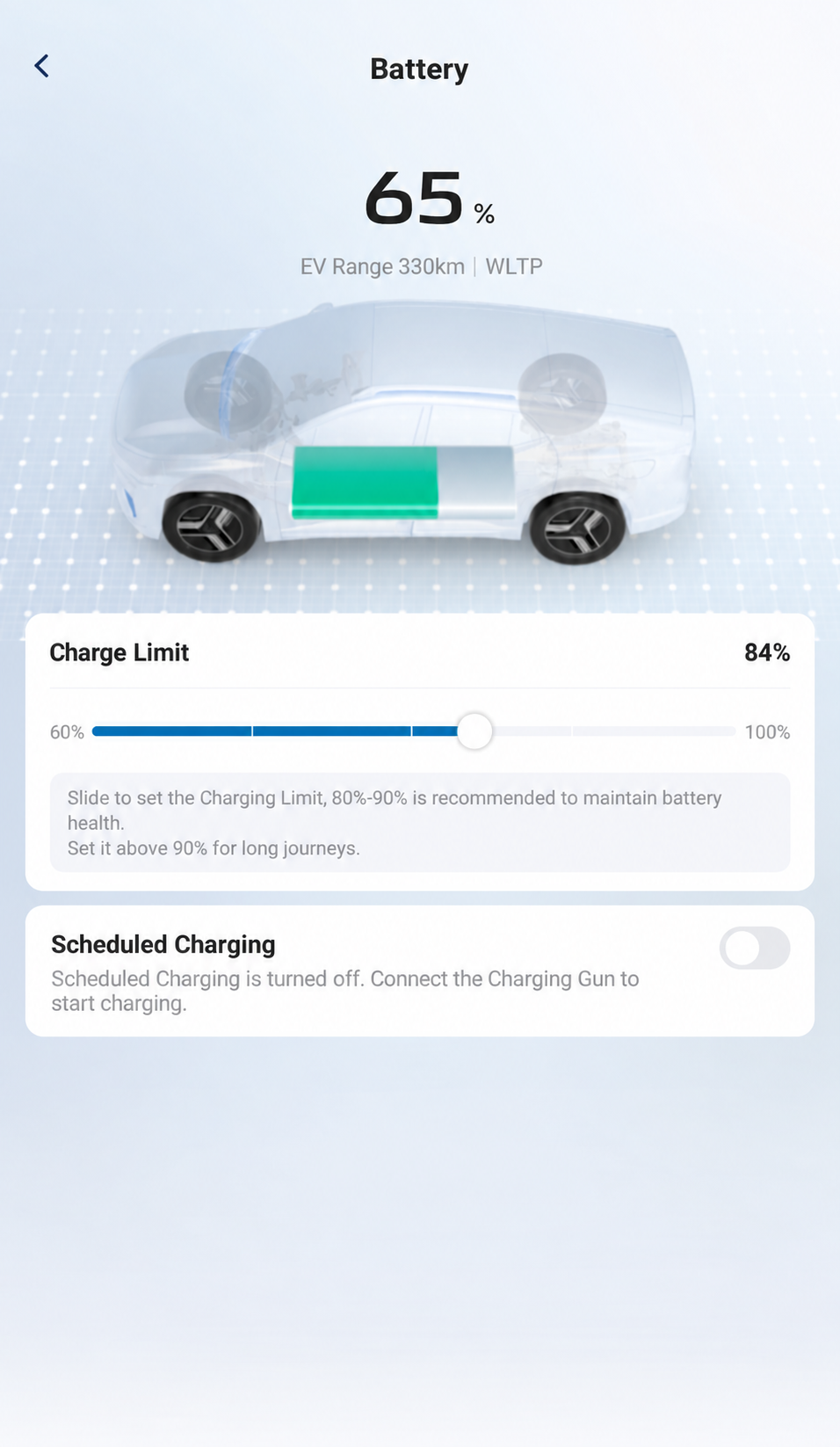
Read battery percentage and EV Range, then compare with your vehicle. The illustrated values are a dated example, not departure targets or a forecast for your trip.
AI-Edited App Reference · Android V1.12.0 · Australia · Shared E07 Recipient. Screens and available controls may differ by account and app version. Reviewed 10 October 2026.