Vehicle OTA steps follow the owner’s manual. App reference: international Android V1.12.0 with Australia selected and a shared E07 recipient account, checked 10 October 2026. These screens do not verify a completed vehicle OTA or phone app update.
Over-the-air (OTA) updates deliver changes to vehicle software. Read DEEPAL Australia’s E07 Release Notes for the changes in a published release, then check what your car offers. A published release does not prove it is offered to your vehicle yet.
Australia and China Software Snapshot
Australia
DEEPAL Australia’s public E07 release-notes page, checked 14 October 2026, lists Update 1.1.0. Its published changes cover improved IACC speed control through corners, intelligent high-beam optimisation, retention of the emergency lane-keeping on/off setting, Android Auto fixes, a centre top-tether manual update, redesigned ADAS voice-broadcast settings and voice/call-volume optimisation.
An Australian E07 owner confirmed 1.1.1 was offered to their vehicle by 30 September 2026. DEEPAL Australia has not published a 1.1.1 change list on its OTA page. Availability can vary by vehicle, and one owner-confirmed version does not establish that every Australian E07 should already receive it.
China
The Chinese release history reviewed on 6 October 2026 includes SDA OS-N 1.6.0, reported on 9 May 2026. It belongs to the Chinese-market OS-N software branch. This selected history does not establish the latest version available to every Chinese E07.
Install from the Car
Find the Update
Connect the car to the internet. Open Vehicle Settings, choose System, then select System Upgrade. You can also follow the car’s update notification.
Prepare to Park
Choose a time when you will not need to leave immediately. Park safely in P, read this update’s displayed installation requirements and allow the time the vehicle requests. Requirements can differ by release; this guide does not set a universal battery percentage or installation time.
Follow the Prompts and Wait
Start or schedule the installation as offered. Wait for completion before using the car. The manual warns that functions may be limited or disabled; restarts, brief warnings or a black screen can occur during installation.
Check Vehicle Upgrades from the App
The manual describes opening Car Control and choosing Upgrade to check whether new vehicle software is available and make an upgrade appointment. The Australian shared-recipient example does not establish that this option is available. Account roles and current software can change the controls available.
If your app offers a vehicle upgrade, read the version, requirements and confirmation actually shown. For missing vehicle information or remote access, use Internet and Bluetooth Requirements and App Troubleshooting.
Record the Phone App Version Separately
From vehicle home, tap the person icon to open Personal Center, then choose About Us and read APP Version. The example page displays V1.12.0, which identifies the phone app rather than the vehicle OTA version. Any phone app update prompt concerns that installed app; read its details before proceeding. A displayed APP Version does not confirm that a phone app update is available or installed.
The home speech bubble opens Message Center. The example shows No Messages; it did not establish an available update. Read the current message or upgrade prompt rather than inferring its purpose from the icon.
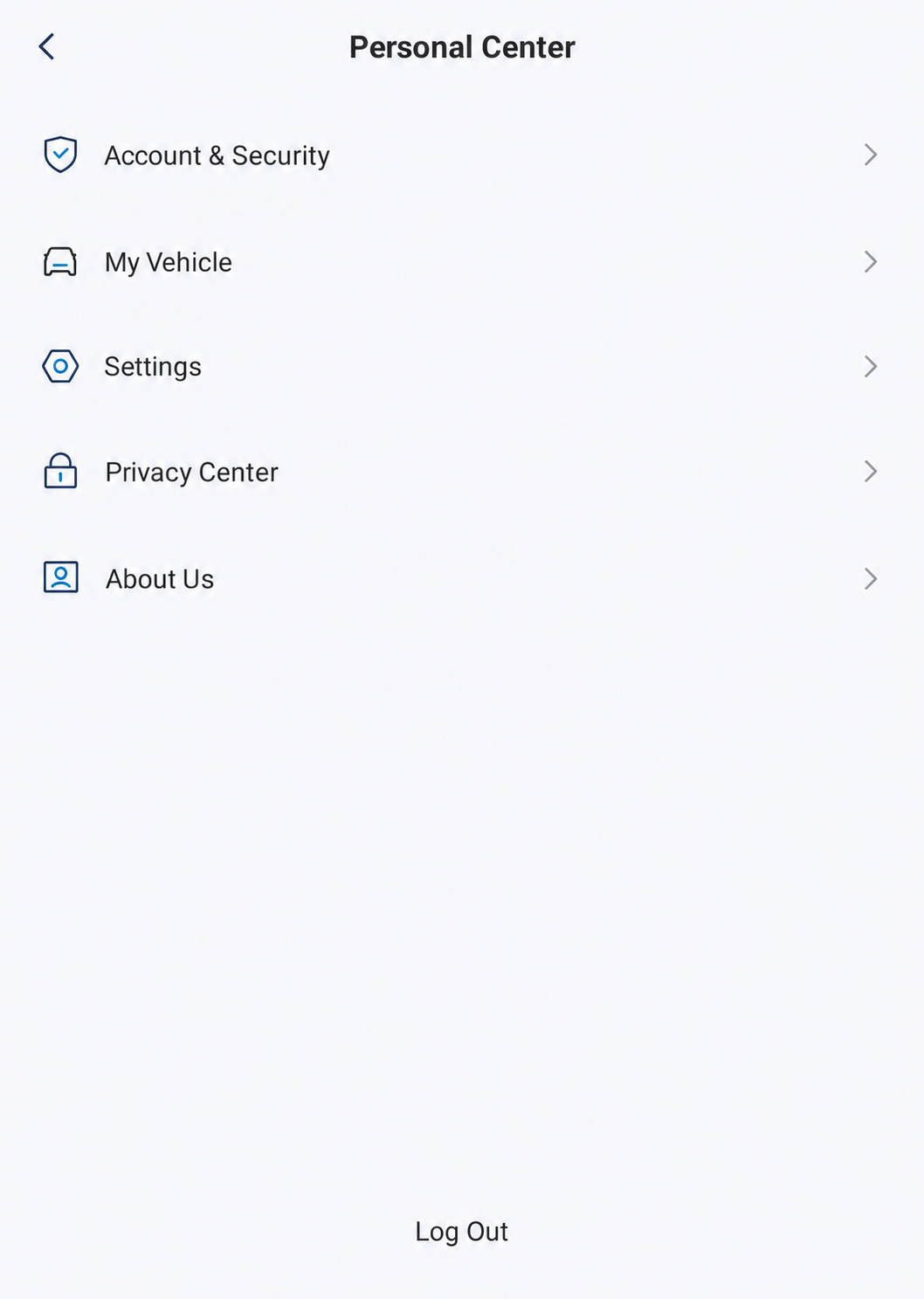
About Us is the entry for APP Version information. This menu illustrates phone app navigation; it does not show the vehicle’s System Upgrade page or a successful update.
AI-Edited Reference · Android V1.12.0 · Australia · Shared E07 Recipient · Reviewed 10 October 2026. Screens and available controls may differ by account and app version.When reporting an issue, record the phone app version and the vehicle software version as separate values. Use App Settings and Information for the observed app navigation.
Afterwards, record the installed vehicle software version separately from the phone app version when comparing guides or describing an issue. For help with a particular release, use DEEPAL’s Contact Page.
Documented Chinese E07 OTA Highlights
This is a selected history from Chinese release reporting, reviewed 6 October 2026. The January report names Tops OS; the July and May reports name SDA OS-N. These reports do not establish feature availability or compatibility on an Australian E07.
Tops OS 1.1.0 · January 2025
Chinese release reporting documented Camp Guard, remote interior and exterior live monitoring and talk-back, remote photographs and recording, front exterior-camera recording, leave-car constant temperature, parking-surround photographs sent to the app, remote sunshade closing, rear Pad controls and permissions, enlarged HUD junction views, exterior interaction-screen scenes, welcome/farewell lighting and an extreme-performance configuration mode.
SDA OS-N 1.3.0 · July 2025
The release was described as adding more than 80 functions and more than 30 scene-programming items. Published highlights included broader driver-assistance scenarios, key-controlled remote parking, one-button body transformation, energy-management changes, a map SDK upgrade, custom exterior interaction-screen content, upgraded AI and scene programming, rear comfortable entry/exit, music-linked ambient lighting, a front-passenger makeup light, a custom rear Pad with the PadLink app, Bluetooth vehicle control, WeChat and Honor digital keys, and a developer platform.
SDA OS-N 1.6.0 · May 2026
Published changes included Xiaomi Wallet and NFC keys, automatic and improved Sentry/Tower operation, storage-device warnings, voice control for car-wash mode, automatic ambient lighting, navigation service-area waypoint controls, remembered nap-mode seat position and screen behaviour, refusal of insecure Wi-Fi, an automatic flush-door-handle option, app-controlled charging termination, charging-plug alerts, automatic discharge-connector unlocking and revised physical tailgate-switch behaviour.
Many Chinese features depend on China-only cloud services, maps, apps or hardware. In particular, ZTE identifies the demonstrated E07 rear device as the nubia Pad 3D II with Changan’s custom PadLink vehicle-control software. The Chinese OTA history does not establish PadLink support, tablet-dock power or retrofit compatibility on an Australian E07.
E07 Owner’s Manual — p. 133 (PDF p. 144).
E07 Owner’s Manual — p. 70 (PDF p. 81).
Observed app navigation: 10 October 2026, Android V1.12.0, Australia, shared E07 recipient. Upgrade actions and outcomes untested.
Australian E07 Release Notes · Checked 14 October 2026China Tops OS 1.1.0 ReportChina OS-N 1.3.0 ReportChina OS-N 1.6.0 ReportZTE: E07 PadLink and nubia Pad 3D II